
Tagged Review 2026: Legit or Waste of Money?
The Tagged dating app is legit: it is a real, long-running social app run by The Meet Group, with 50M+ downloads on Google Play and a free tier that lets you browse, swipe and chat without paying. It is a waste of money only if you expect Premium or Gold to buy you dates: Tagged is now mostly a live-streaming and chat app where spending goes to gifts for streamers, and the app stores are full of complaints about fake profiles, spam and sudden bans. Use it free for casual chat and new friends; look elsewhere if you want a serious relationship.
What is Tagged, and who runs it?
Tagged started as a social network and says it has joined people locally and worldwide since 2004. Today it calls itself "your social network" for "friendships and dates", and the app's store listings put live video first: watch a stream or start your own, meet people nearby, chat, and play the long-running Pets game.
The company behind it is The Meet Group, Inc., based in New Hope, Pennsylvania, which also owns MeetMe, Skout and Hi5 (Wikipedia). On the App Store the seller is listed as Ifwe Inc. You can use it on the web at tagged.com, on iPhone and on Android. Tagged’s help center also says the Hi5 Android app was folded into Tagged, with Hi5 members asked to log in to Tagged with their old credentials.
Who the Tagged dating app is for (and who should skip it)
- Good fit: adults who enjoy live streams, group banter and low-pressure chat, and who are happy meeting new friends first and maybe dating later. Tagged also suits people who want a free app with a big audience rather than a paid matchmaking service.
- Poor fit: anyone looking for a long-term partner with clear intentions, anyone who wants every profile verified, and anyone who hates ads. Google Play reviewers complain about ads "after every 2 swipes".
- Not for: anyone under 18. The Tagged terms require members to be at least 18. Google Play rates the app Mature 17+ and the App Store rates it 18+; the terms are what count.
How Tagged works: matching, chat and Live
There is no compatibility quiz. You build a profile, then meet people in four main ways:
- Swipe and match: the store listings describe swiping through people nearby and matching "with people just like you, thanks to our algorithm". Google's summary of the app also mentions filters by location, age and interests.
- Chat: messaging is free. Tagged Gold can be spent on gifts in chats, which the help center says increase your visibility in another user's messages.
- Tagged Live: live video streams where viewers chat and send paid gifts. Inside Live, NextDate lets a streamer bring guests into a "date box" one after another, with viewers voting with a flame icon and the pair able to switch to a 1:1 video chat.
- Extras: LUV (every member gets 10 LUV a day to send to profiles, more with Gold), a list of who viewed your profile, and Pets, a game where members "buy" and "sell" each other's profiles with virtual cash.
So in practice, Tagged is a social app with dating mixed in. If you want a swipe app built around dating only, my Tinder review and Bumble review cover the obvious alternatives.
Is Tagged free? Free vs paid
Yes, the core is free: creating a profile, browsing, swiping, chatting, watching Live and playing Pets. Money comes in two forms: a Premium subscription and Gold, the virtual currency for gifts. Tagged does not publish a list of what Premium includes, on its website, in the help center or in the store listings, which is a red flag for a subscription: you are asked to pay $9.99 a month without a written feature list.
| What you buy | Price (US) | What it does |
|---|---|---|
| Free account | $0 | Profile, swipe, chat, watch and host Live, Pets, 10 LUV a day |
| Tagged Premium (1 month) | $9.99 | Subscription; benefits not listed publicly; renews automatically |
| Gold, smallest App Store pack | $1.99 for 2,000 Gold | Gifts to streamers, gifts in chats, extra LUV |
| Gold, largest App Store pack | $99.99 for 400,000 Gold | Same, in bulk |
| Google Play in-app items | $0.99 to $249.99 per item | Gold and Premium on Android |
Prices checked October 2026 on the App Store listing and the Google Play listing. The App Store list is messy: several Gold packs share a price (2,500 and 5,000 Gold are both $4.99; 10,000 and 20,000 are both $9.99; 45,000 and 50,000 are both $19.99), so check which pack you tap.
What you can lose
The fine print matters more than the price. The terms say Premium renews automatically unless you switch off auto-renewal at least 24 hours before the period ends, that unused subscription time is lost if you delete your account, and that all Gold is forfeited if your account is deleted, blocked or banned "for any reason". That last point lines up with the angriest App Store reviews: streamers and viewers who say they lost coins or earnings after a ban with no real appeal.
Can you make money on Tagged?
Streamers can. Viewers' gifts turn into Diamonds, and Diamonds can be converted to a cash reward from the Live settings, after an ID verification. Tagged lists the fees: $1 for a US PayPal account, 2% for an international PayPal account, $1 for a US ACH transfer, $7 for non-US ACH, $15 for a US wire and $26 for a non-US wire in dollars. Remember the catch above: a ban takes the balance with it, so cash out regularly if you stream.
Safety and verification on Tagged
Tagged has more verification than many free social apps, but less than the word suggests:
- Mandatory check when prompted: if the app asks, you must complete a face scan before you can get back in. It works only in the iPhone and Android apps, not on the website.
- Age checks: the Community Guidelines say age verification may use a face scan or a government ID, and warn that verification "should not be relied upon as a substitute for personal judgment".
- Optional blue check: a photo verification gives a check mark showing the person matches their profile photo. Changing the photo removes it. Profiles without the check are not proven fakes, but a check is the first thing to look for.
- Report and block: every profile has a Report button (the "..." menu in the app), Live has its own report icon, and the help center explains how to report abusive content.
- Privacy: the listing promises your exact location is never shared without permission, but the App Store privacy label says purchases, location, identifiers and usage data may be used to track you for advertising.
Fake profiles, scams and complaints
On the App Store, Tagged has 4.5 stars from 461K ratings; on Google Play, 4.1 stars from 1.06M reviews (October 2026). The averages are decent, but the written reviews repeat the same problems:
- Fake and spam profiles: reviewers describe daily messages from accounts pushing them to other sites or paid content, and "money-grubbing scammers".
- Pay-for-attention in Live: some say streamers only answer viewers who send paid gifts.
- Bans without appeal: streamers report losing coins and earnings after mass reports. Tagged's help center now says you can appeal a ban by email to support@tagged.com.
- Coins that vanish: one App Store reviewer says their coins were spent in a day they were not on the app; check your login security.
Tagged's own advice on spammy messages names the patterns: ads for another site and invitations to continue on a third-party messenger. Report those as spam and block. My rules on top: never send money or gift cards, never move to another app before a video call, and meet in a public place the first time.
What happened to Tagged?
If you remember the old Tagged with its news feed and groups, the app has changed a lot, and several third-party guides are out of date. Here is what Tagged's own help center confirms:
- Groups are gone: "Groups are no longer supported", only private messages remain.
- Old chats disappear: Tagged does not keep chats indefinitely, so save anything you need.
- A new website: 2026 help articles explain where to find Pets and LUV on the redesigned site.
- Hi5 merged in: Hi5's Android app moved its members to Tagged.
App reviews add what the help center does not: a tighter "nearby" radius, the old feed replaced by Live, Facebook login removed, and trouble logging out. Tagged is not shutting down: Google Play shows an update on September 25, 2026.
Pros and cons
Pros
- Free to browse, swipe and chat
- Huge audience: 50M+ Google Play downloads
- Live video and NextDate let you see someone before meeting
- Face scan checks and an optional verified badge
- Run by an established US company with a public help center
Cons
- Dating is secondary to streaming and gifting
- Premium costs $9.99 a month with no published feature list
- Heavy ads on the free app
- Many complaints about spam, fake profiles and bans
- Gold and earnings are forfeited if you are banned
How to cancel Premium and delete your Tagged account
Cancel where you paid, then delete on the website. Deleting does not stop an app store subscription by itself, and the help center says Premium members must cancel Premium first to prevent future billing.
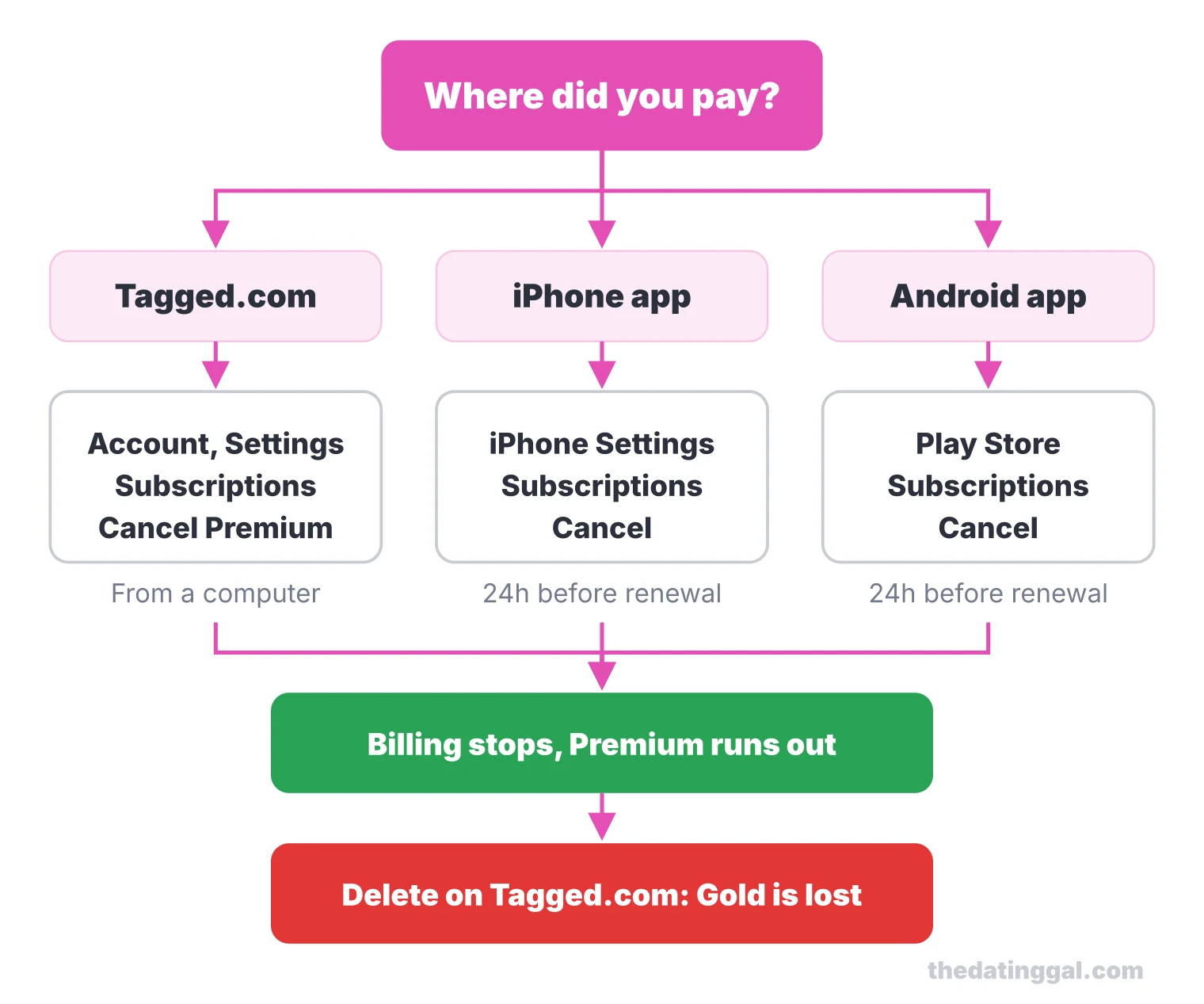
- Cancel Premium following Tagged's cancellation guide: on Tagged.com from a computer (Account, Settings, Subscriptions and Payments, Cancel Premium); on iPhone in Settings, your name, Subscriptions; on Android in the Play Store, Payments and subscriptions, Subscriptions. Do it at least 24 hours before renewal.
- Ask for a refund if you just bought: email support@tagged.com with the date, the store and the transaction ID (refund guide). The terms say Apple purchases are refunded by Apple, and describe a 14-day withdrawal right, minus any Gold you used.
- Deactivate or delete on the website: the app cannot do either. On Tagged.com go to Account, Settings, then "Cancel your Account". To deactivate, choose a reason and confirm; signing back in reactivates you. To delete for good, tick the box to permanently delete your data, messages and photos, then enter your password.
Tagged alternatives
If you came for dating rather than streaming, these are better bets, each with a full review:
- For casual swiping with a huge pool: Tinder.
- For women who want to make the first move: Bumble.
- For a free app with lots of messaging: Plenty of Fish.
- For matching on values and questions: OkCupid.
For relationship-first options, see my serious dating apps page, or browse dating app alternatives and the full list of dating site reviews.
How I rate it
I give Tagged 3 out of 5. That rating is based on public pricing, features, safety tools, app store reputation and value, not on hands-on use. Value for money: 3 (the free tier is generous, but Premium has no published benefits). Safety and verification: 3 (face scans and a verified badge, but persistent spam complaints). Evidence of an active user base: 4 (50M+ downloads, over 1.5 million ratings across both stores, updates in September 2026). Features for people who want to date: 3 (Live and NextDate are fun, dating tools are thin). Transparency: 2.5 (auto-renewal and cancellation are documented, Premium perks are not, and Gold is forfeited on any ban).
Frequently asked questions
Is the Tagged dating app legit?
Yes. Tagged is a real app run by The Meet Group, Inc. in New Hope, Pennsylvania, with 50M+ downloads on Google Play. It is not a scam, but reviewers report many spam and fake profiles, so treat any request for money or to move to another app as a red flag.
Does the Tagged app pay?
Streamers can earn. Gifts from viewers become Diamonds, which can be converted to a cash reward after an ID verification. Tagged lists fees such as $1 for a US PayPal account and $15 for a US wire, and a ban forfeits your balance.
How do I message on Tagged?
Open a profile or a match and start a chat; messaging is free. You can also chat inside Live streams. Gold gifts sent in chats make your message more visible, but they cost money and are optional.
How do I deactivate or delete my Tagged account?
Both are done on the Tagged.com website, not in the app: Account, Settings, then Cancel your Account. Signing back in reactivates a deactivated profile; ticking the permanent deletion box erases your data, messages and photos. Cancel Premium first so you are not billed again.
What has happened to Tagged?
Tagged is still active and was updated in September 2026, but it has changed. Groups are no longer supported, old chats are not kept indefinitely, Live video replaced the old news feed, and the Hi5 Android app was folded into Tagged.
What is the #1 dating app?
There is no single number one: Tinder is the biggest swipe app, Bumble suits women who want to message first, and OkCupid or Hinge suit people looking for something serious. Tagged is better for casual chat and live streams than for dating.