
UkraineDate Review 2026: Real Profiles or Scam?
UkraineDate is a real dating site, not a scam company: it is run by Cupid Media, an Australian firm behind 30+ niche dating sites, and its Android app has 1M+ downloads. But the UkraineDate dating site has a serious fake-profile problem, a free tier that barely lets you talk, prices hidden until you log in, and no iPhone app. Pay only if you want a long-distance relationship with someone from Ukraine and will check every match yourself.
What is UkraineDate, and who runs it?
UkraineDate is a dating website and Android app for meeting Ukrainian singles, mostly women, from Ukraine and abroad. Its contact page says it has been part of Cupid Media since 2004, and Cupid Media's own page describes a network of "over 30" niche dating sites. Its sister sites include FilipinoCupid, which I cover in my FilipinoCupid review, and they all share the same software, tiers and rules.
The legal operator, named in the Terms of Use (last updated 28 September 2026), is Cupid Media PTY LTD, registered in Queensland, Australia. How big is it? The marketing does not agree with itself. The German home page claims over 1 million members, a Google Play screenshot says "Trusted by 1,000,000 members", and the Play description talks about "thousands of active Ukrainian members". A million is a count of accounts ever created, not people online today, and Cupid Media does not publish active user numbers.
Who the UkraineDate dating site is for (and who should skip it)
- Good fit: men (and some women) in the US, Canada or Europe who want a serious relationship with someone Ukrainian, are ready for a long-distance phase, and plan to meet in person eventually.
- Also a fit: Ukrainians living abroad who want to date within their culture and language.
- Poor fit: iPhone users who want an app (there is none, more below), anyone who will not pay, and anyone who wants every profile checked before it goes live.
- Not for: anyone shopping for a "mail order bride". The terms say UkraineDate is not a marriage broker, mail order bride or matchmaking service, and they warn that some countries ban marriage-matching services altogether. Members must be 18 or older.
How matching and messaging work
There is no personality quiz. You join free with your name, gender, who you are looking for, age, email and password, add photos (reviewed by staff, usually within 24 hours, per the profile approval article), and then:
- Search: the basic search covers gender, age, location, photo only and last active date; the advanced search adds ethnicity, religion, height, weight and more, and you can search by first name or member number (search guide). The public directory pages that rank on Google (by age, religion, city, education) are simply pre-filled searches.
- Matches: a list built from your match preferences. Platinum and Diamond members also get "mutual and reverse matching".
- Likes: a free way to show interest. The other person is notified and can like you back.
- Messages and Instant Messenger: written messages and a live one-to-one chat.
- Translation: Platinum and Diamond members can translate messages; Gold and free members can translate only the messages they receive from Platinum and Diamond members (translation article). English to Ukrainian and English to Russian are both on the list of language pairs.
The missing piece: the Instant Messenger does not support audio or video. On a site where the main worry is "is this person real?", you cannot video-check anyone without leaving the platform.
The app: Android only
The Google Play listing (developer: Cupid Media) shows 1M+ downloads, 4.1 stars from 28.8K reviews, a Mature 17+ rating, "Contains ads" and an update on October 2, 2026. There is no iPhone version: UkraineDate's home page and Cupid Media's portfolio page link only to Google Play, and I found no UkraineDate listing on the US App Store in October 2026. On an iPhone you use the website in your browser, and you pay on the website.
Is UkraineDate free? What the free tier allows
Joining, building a profile, browsing, searching and sending likes are free. Talking is not, and the rules are stricter than the "join free" banners suggest:
- A free (Standard) member cannot read or reply to messages from another free member. You can read and reply only to paying members, per the help center.
- Free members can start only 3 new conversations per 24 hours; paid members can start up to 500 (daily limits article, updated July 2026).
- The free version shows ads; every paid tier removes third-party ads.
So when a message notification arrives and you cannot open it, the sender is another free member. That is the "rip off" Google Play reviewers describe, and Cupid Media's replies there confirm the rule. In practice, one side of every conversation has to pay.
UkraineDate prices and plans
UkraineDate does not publish its prices. The help center says prices vary by country and currency and sends you to the Upgrade page, which requires a login. Here is everything that is public:
| Plan | Price | What it unlocks |
|---|---|---|
| Standard (free) | $0 | Profile, search, likes, 3 new conversations a day, replies to paying members only, ads |
| Gold | Not published (shown after login) | Unlimited messaging with everyone, instant messenger, no ads, profile boost, hide profile and photos, virtual gifts, coins |
| Platinum | Not published (shown after login) | Gold, plus message translation, exclusive search filters, mutual and reverse matching, ranking above Gold and free members |
| Diamond | Not published (shown after login) | Platinum, plus ranking above all members, priority in inboxes, Diamond badge, 24/7 premium support |
| Android in-app range | $16.99 to $204.99 per item on Google Play (this covers every plan length and coin pack) | |
Prices checked October 2026. Tier benefits come from the help center's benefit table and section 2.8 of the terms. On the website you can pay by credit or debit card, Google Pay, vouchers or country-specific methods (payment methods). Other sites quote exact monthly prices for UkraineDate, but I could not confirm any of them at the source, so I am not repeating them.
Coins and auto-renewal: the small print
- Coins pay for virtual gifts, which cost 10 to 4,990 Coins each. Paid plans include up to 1,400 complimentary Coins, and unused Coins expire 365 days after purchase. Gifts do nothing to help you check whether someone is real, so I would not buy Coins.
- Every plan auto-renews for the same length unless you switch it off. If UkraineDate raises its prices, your renewals stay at the old price, per the terms.
The cheapest sensible way in
Browse free first and see whether the profiles in your age range and area look real (and run a few reverse image searches). If you pay, the help center says paid members get 500 new conversations a day, far more than you need, so the only real choice is Gold or Platinum. Pick Platinum only if your matches write in Ukrainian or Russian, since translation is the main thing it adds. Take the shortest plan the Upgrade page offers, and switch off auto-renewal straight away; you can still use the plan until it ends.
Real profiles or scam? Ratings and complaints
UkraineDate the company delivers what you pay for, publishes its legal name and address, and runs a full help center. The problem is the people using it to scam others. The ratings show it (all checked October 2026):
- Google Play: 4.1 stars from 28.8K reviews, 1M+ downloads.
- Trustpilot: 1.4 out of 5 from 450 reviews, with 56% one-star and 24% five-star (Trustpilot page). Trustpilot notes the company has not replied to negative reviews.
The written complaints in 2026 repeat the same story. Google Play reviewers say most profiles are scammers using pictures pulled from the internet, altered videos and AI-written chat (August 2026). Trustpilot reviewers estimate 80% to 99% of women's profiles are fake, one says he reported 411 profiles, and one says he lost about 5,000 euros to someone claiming to live in an occupied area. Others describe accounts suspended after paying, a demand to upload a passport, and trouble stopping recurring billing. Trustpilot does not verify these claims, and unhappy users are more likely to post, but the pattern is consistent across both platforms.
Cupid Media's side: the help center says a dedicated Fraud Prevention team works on scams, and its replies on Google Play point users to the Report Abuse button. The 2026 terms ban asking for money, investment and crypto pitches, AI chatbots, undisclosed AI-generated profiles and scam networks, and let Cupid Media demand ID, liveness or biometric checks when a profile looks synthetic. The passport requests and suspensions people complain about are that system at work, and it sometimes lands on honest members.
Safety and verification on UkraineDate
- ID verification is optional. You can upload a color copy of a valid government photo ID (passport, driver's license); once approved, a verified status shows on the profile, and the help center says the document is destroyed after processing (verification article). Because it is optional, an unverified profile proves nothing either way.
- No routine background checks. The terms say Cupid Media "does not routinely undertake background checks, verify information provided or conduct criminal screenings".
- Report and block: the Report Abuse button (the ! icon) sits on photos, messages and profiles, and in the Instant Messenger's three-dot menu (how to report). Add screenshots and details.
- The site's own warnings: the Dating Safety page tells you to keep chats on the platform, says scammers move conversations to other apps quickly and avoid phone or video calls, and warns about people "stuck" somewhere who need money to get home.
- Privacy: Google Play's data safety section says the app may share location, personal info and other data with third parties. The terms also let Cupid Media copy your profile to its other dating sites and register you with "Friendly Services"; you can unsubscribe from their emails.
How to tell a real profile from a scammer
With no in-app video and optional verification, the checking is on you. The FTC's guide to romance scams lists the same patterns as the UkraineDate complaints: strong feelings very fast, a push to move to another app, reasons they can never meet, and requests for money for travel, visas, medical bills or crypto, paid by wire, gift cards, money apps or cryptocurrency.
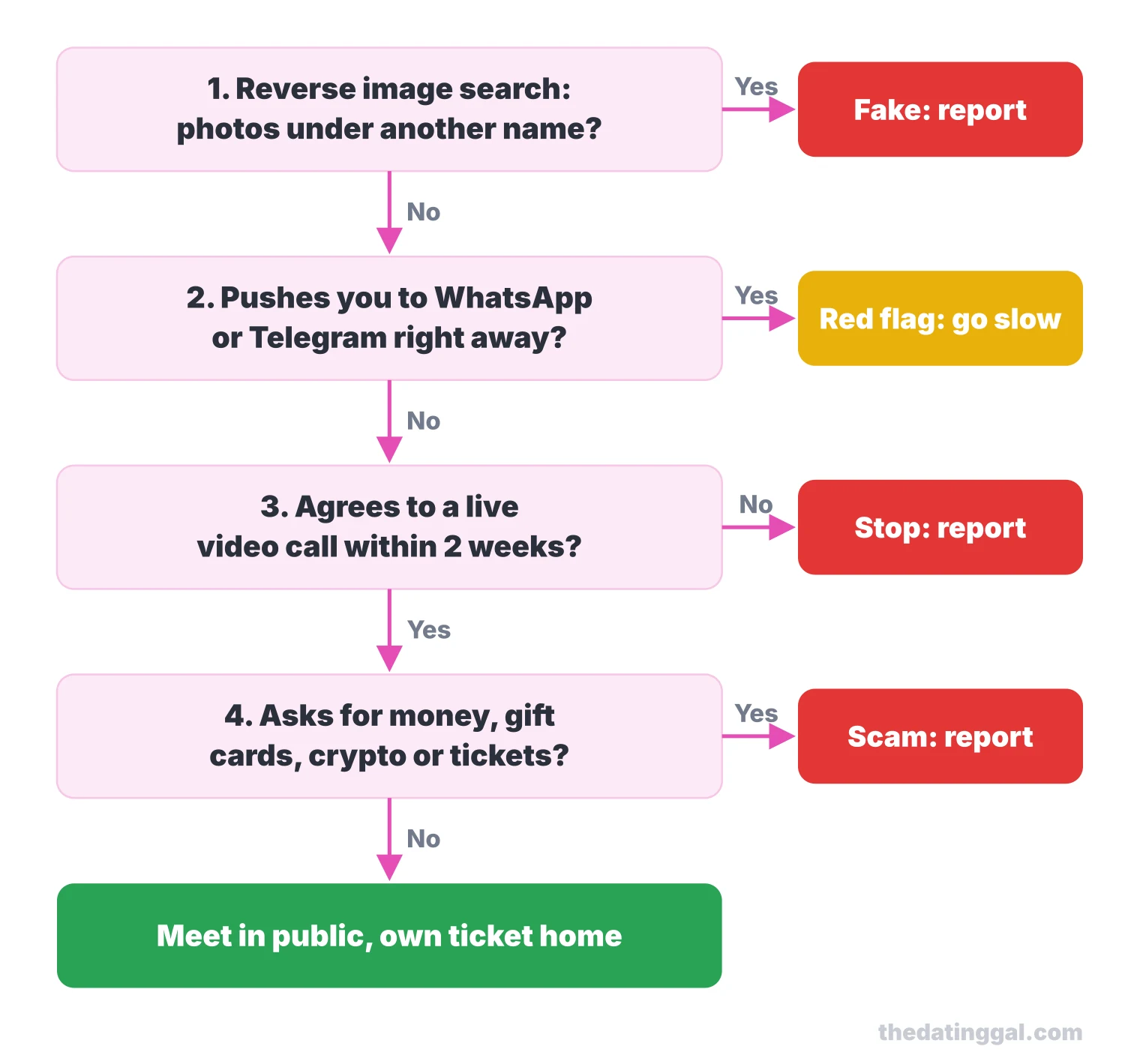
- Reverse image search the photos. A face that shows up under another name, on a model's page or on several profiles is fake. Report it.
- Watch for the app switch. A push to WhatsApp, Telegram or email in the first messages is a red flag, per both UkraineDate and the FTC. Keep chatting on the site until you have checked the rest.
- Ask for a live video call on a video app within a week or two. Someone real agrees. A camera that is always broken, or a pre-recorded clip instead of a live call, means stop.
- Never send money, gift cards, phone credit, crypto or "ticket money", whatever the story, including stories about the war. UkraineDate's terms forbid members from asking, so a request is grounds to report.
- Report it with Report Abuse, then at ReportFraud.ftc.gov if you lost money.
- When you do meet, meet in public, tell someone where you are, and pay for your own transport and ticket home. If you plan to travel to Ukraine, check the US State Department's travel advisory first.
Pros and cons
Pros
- A long-running site built only for Ukrainian dating, run by a registered company with a public address
- Detailed search filters, plus English to Ukrainian and Russian translation on Platinum and Diamond
- Optional government ID verification with a visible status
- Clear help center pages on billing, auto-renewal, refunds and deletion
- Free browsing lets you judge the profiles before you pay
Cons
- Heavy complaints about fake profiles and money requests (1.4 out of 5 on Trustpilot)
- Free members cannot message each other and can start only 3 conversations a day
- Prices hidden until you log in
- No iPhone app, and no audio or video chat anywhere on the platform
- Narrow refund policy and auto-renewal on every plan
How to cancel UkraineDate and delete your account
Stopping payment and deleting your profile are two separate steps. Deleting your profile does not cancel a Google Play subscription, and the help center recommends changing auto-renewal at least 48 hours before your plan ends.
- Paid on the website: log in, click the gear icon, choose Billing, click the slider next to "Your membership auto-renewal is ON", then Confirm (cancellation guide). If you see no auto-renewal option, your plan does not renew.
- Paid in the Android app: Play Store, your profile picture, Payments and subscriptions, Subscriptions, UkraineDate, Cancel.
- Delete or deactivate: open your profile menu (the photo avatar on desktop, the three lines in the app) and choose Switch Off Profile. Deactivate hides you until you click "Reactivate Me". Delete removes the profile permanently after 30 days, and you can still reactivate within those 30 days (switch-off guide).
Refunds: when you can get your money back
The refund policy promises a full refund only if your account had technical problems, the site was down for an unacceptable time, or you ask before you have contacted or been contacted by any member. There are no partial refunds for unused time; anything else is at Cupid Media's discretion. If you live in Arizona, California, Connecticut, Illinois, Iowa, Minnesota, New York, North Carolina, Ohio or Wisconsin, the terms give you 3 business days after subscribing to cancel for a refund, by a signed, dated notice sent by registered or certified mail to Cupid Media in Bundall, Australia. A charge you do not recognize may appear as "UkraineDate.com Southport AU"; the help center says it refunds in full when a card was used without permission. Google Play purchases go through Google's refund process.
UkraineDate alternatives
If the fake-profile risk puts you off, these have full reviews:
- For international dating with a big, mixed pool: Dating.com or Badoo.
- For the same Cupid Media setup in another country: FilipinoCupid, with the same tiers and rules but an iPhone app.
- For a serious relationship closer to home: eHarmony.
For more relationship-first options, see my serious dating sites page or the full list of dating site reviews.
How I rate it
I give UkraineDate 2.5 out of 5. That rating is based on public pricing, features, safety tools, app store reputation and value, not on hands-on use. Value for money: 2 (one side has to pay for any conversation, and you cannot see the price before you register). Safety and verification: 2 (optional ID verification, a fraud team and clear reporting, but no routine checks, no video chat, and a 1.4 out of 5 Trustpilot score built on scam complaints). Evidence of an active user base: 3 (1M+ Android downloads, 28.8K Google Play reviews, an app update in October 2026, but no active-member figure and no iPhone app). Features for its audience: 3 (translation into Ukrainian and Russian and detailed filters suit cross-border dating). Transparency: 2.5 (auto-renewal, cancellation, deletion and refunds are well documented, but prices sit behind a login).
Frequently asked questions
Is UkraineDate legit or a scam?
UkraineDate is a legitimate site run by Cupid Media PTY LTD, an Australian company that operates over 30 niche dating sites. The risk comes from scammers using it: Trustpilot rates it 1.4 out of 5 from 450 reviews, mostly over fake profiles and money requests. Verify every match with a video call and never send money.
Is UkraineDate free?
Joining, browsing, searching and sending likes are free. Free members can start only 3 new conversations a day and cannot read or reply to messages from other free members, only from paying ones. In practice one side of each conversation has to pay.
How much does UkraineDate cost?
UkraineDate does not publish its prices; they vary by country and appear on the Upgrade page after you log in. On Google Play, in-app purchases range from $16.99 to $204.99 per item (October 2026). Gold, Platinum and Diamond plans all renew automatically unless you switch it off.
Is there a UkraineDate app for iPhone?
No. UkraineDate has an Android app on Google Play with 1M+ downloads, but the official site and Cupid Media link to no App Store version, and none was listed on the US App Store in October 2026. iPhone users can use the website in a browser.
Are the profiles on UkraineDate real?
Some are and many are not, according to user reviews on Trustpilot and Google Play. ID verification is optional and Cupid Media does not run routine background checks, so run a reverse image search, ask for a live video call early, and report anyone who asks for money.
How do I cancel UkraineDate?
On the website, go to Settings (gear icon), Billing, and turn off the auto-renewal slider, at least 48 hours before renewal. If you paid on Android, cancel in Google Play under Payments and subscriptions. Deleting your profile through Switch Off Profile does not stop billing on its own.