
Upward Review 2026: Is It Good for Believers?
Upward is a legit, Match Group owned dating app for Christians and other values-first singles who want marriage, and you can match and chat for free. My take from the Upward dating app reviews, the help center and the terms: try the free version, but think hard before paying, because the useful extras are split across three tiers and the most common complaints are far-away matches and paywall pressure.
What is Upward, and who runs it?
Upward is a swipe-style dating app for iPhone and Android. Its own About page says it was founded in 2020 as a Christian dating app and remains grounded in its faith-based roots, and the Google Play listing shows a release date of March 4, 2020. (One of the top-ranking reviews says it launched in 2021; the official dates say otherwise.)
The publisher is Affinity Apps LLC. Upward’s customer care page lists it at 8750 North Central Expressway in Dallas, with Match Group’s CEO as legal representative, and Match Group’s 2025 annual report (Form 10-K) lists Upward among its Emerging brands, next to BLK, Chispa and The League. So yes, Upward is owned by the same group as Tinder, Hinge and Match. That explains both its polished app and its paywall design.
You can find it at appupward.com, which mostly points you to the app downloads.
Who Upward is for
- Good fit: Christians who want a relationship heading toward marriage, like the Hinge-style swipe format, and live where there are plenty of other members.
- Also welcome: people who lead with “faith, family, loyalty, integrity”, as the current store listing puts it. Faith is self-reported, and nothing checks a person’s church or denomination.
- Poor fit: rural users, anyone who wants to search for someone specific, and people who only want to see one denomination. App Store reviewers say their denomination and distance preferences do not always hold.
How matching and messaging work
You build a profile, swipe right to like or left to pass, and you can only message after a mutual match. Upward’s help center confirms this in its messaging guide, and the Google Play listing says chatting after a match is free. So yes, you can match and talk on Upward without paying.
The profile is where Upward differs from a general app:
- Core Values: you pick the values that shape your life, shown on your profile.
- Marriage Timeline: you state when you hope to marry, so intentions are clear from the start.
- Gems and Spotlight: a daily list of 8 popular profiles. A Gem lets you send a message before matching. You get 1 free Gem a week and can buy packs of 3, 15 or 30 (Gems explained).
- Communities: moderated group chats, now found on your profile edit page.
What changed on Upward in 2026
Most Upward reviews describe an older version of the app. Here is what the store listings and help center show now:
- Less “Christian” on the label. The App Store description no longer uses the word Christian. It calls Upward “the dating app built for modern courtship” and a “values-first community”. Faith is still listed as a value, and the About page keeps the Christian roots.
- Chivalry Mode. An opt-in mode where men are expected to make the first move. To join you need a complete profile, photo verification and your Core Values filled in. The Chivalry Mode FAQ says the “Your Turn / Their Turn” label is a nudge, not a technical restriction: anyone can send the first message.
- Dating only. The App Updates page says the tab for finding friends is being removed so the app focuses on dating.
- Face Check. A required video selfie (more on that below).
- Three paid tiers instead of one: Premium, Elite and Platinum.
Free vs paid: what Upward costs
The free version lets you create a profile, swipe, match and chat. The paid tiers stack on top of each other. This is the split according to Upward’s subscription options page and its Platinum FAQ, all updated October 1, 2026:
| Tier | What it adds |
|---|---|
| Free | Profile, swiping, matching, chat after a match, 1 free Gem a week, ads |
| Premium | Unlimited likes and rewinds, 5 Super Likes a week, 1 Boost a month, no ads |
| Elite | Everything in Premium, plus see who likes you and sort your likes |
| Platinum | Everything in Elite, plus extra filters (recently active, new users, subscribers), priority likes and read receipts |
One thing to know before paying: “see who likes you” is not in Premium. It starts at Elite. Read receipts and the extra filters are Platinum only, and you can apply just one of those filters at a time.
Upward does not publish a price list on its website. The App Store shows these in-app purchases for the US (no tier names beyond what Apple prints):
| App Store item | Price |
|---|---|
| 1 week Elite (three listings) | $17.99, $19.99, $21.99 |
| 1 month Elite membership (two listings) | $19.99, $29.99 |
| Upward Elite Membership | $29.99 |
| 3 months Elite membership | $44.99 |
| 6 months Elite membership | $71.99 |
| Super Like, 5 pack | $2.99, $4.99 |
Prices checked October 2026 on the App Store listing. On Android, the Google Play listing says subscriptions start at $9.99, come in 1-, 3- and 6-month packages, and in-app items range from $0.99 to $119.99. The exact price you see in the app can vary, so check the checkout screen before you tap. The cheapest serious option on the App Store list works out to about $12 a month on the 6-month Elite plan ($71.99 paid up front).
Two other paid extras: Boosts put you in the top 6 results for 30 minutes (multipacks expire in 90 days and cannot be refunded), and Super Likes come in packs of 5, 25 and 60.
Safety and verification
This is where Upward is stronger than most small faith apps, because it runs on Match Group’s trust and safety tools:
- Face Check. Upward now requires a video selfie. The Face Check FAQ says it estimates your age, checks your profile photos match your face, looks for other accounts using your likeness, and gives you a Photo Verified badge. The face data is kept for the life of your account and deleted within 30 days of closing it.
- Age checks. Photos are scanned to estimate whether you are over 18, and suspected minors can be asked for ID (age detection page).
- Safe Message Filters. Automated tools scan messages for harmful or illegal behavior, and trained agents review flagged chats (Safe Message Filters).
- Report and block. You can report a profile from the bottom of it, and reports are anonymous. Blocking deletes your chat and hides you from that person.
- No background checks. The terms of use say plainly that Upward does not run criminal background or identity checks on its users.
Upward’s safety tips list the scams to watch for: never send money or crypto, be wary of anyone “stuck overseas” who needs help getting home, and keep the chat on Upward, since scammers push you to text or other apps quickly. Upward also has no phone support line and warns that support numbers posted online are fake.
Your profile may appear on other Match Group apps
None of the top Upward reviews mention this. A setting called Expanded Discovery & Interaction can show your Upward profile (photos, bio, basic details) in discovery on other Match Group services. Someone there may be prompted to join Upward to talk to you. If you want your faith-dating profile to stay on Upward only, turn it off: Settings, Your Privacy Choices, Match Group Data Sharing, then switch off Expanded Discovery & Interaction. The help center says the option only appears for users and regions where it applies.
Fake profiles, scams and complaints in Upward dating app reviews
Ratings checked October 2026:
- App Store: 4.3 out of 5 from 162K ratings.
- Google Play: 3.8 out of 5 from 49K reviews, 1M+ downloads, “Contains ads”.
- Trustpilot: 1.6 out of 5 from 31 reviews, 97% one-star, profile unclaimed (Trustpilot page).
The complaints repeat across app stores, Trustpilot and Christian forums:
- Paywall pressure. People see a pile of likes but cannot see who sent them without Elite. A Google Play reviewer in June 2026 wrote that the tier structure was not clear before paying.
- Far-away matches. The most common complaint, covered below.
- Scammers and bots. Several 2026 Trustpilot reviews say the most appealing profiles turned out to be scammers.
- Support and billing. Slow or no email replies, refund requests denied, and bans with little explanation.
- Repeat profiles. App Store reviewers say people they swiped left on keep coming back.
- Ghosting. Matches that never go past “How are you?”, the same as on secular apps.
On the other side, App Store reviews include couples who dated, got engaged or married after meeting on Upward, and forum members report real connections too. The fair reading: a legitimate app with real members, but the complaints about money and distance are consistent and worth taking seriously.
Why are people so far away on Upward?
Upward lets you set a distance and age range under Profile, gear icon, seeking preferences, per its account settings guide. Reviewers still describe matches hundreds of miles away. From the reviews and the help center, three causes stand out:
- A thin local pool. A faith app has fewer members than a general app, so in smaller towns there may simply be few people near you who fit your filters. Forum users describe matches “several states away” for this reason.
- Location follows your phone. An App Store reviewer from North Carolina kept seeing Texas profiles after visiting family there, so expect your stack to shift when you travel.
- No manual location. Another reviewer could not set a US location while living abroad. Upward does not offer a passport-style feature.
If your stack is mostly distant profiles after a week of free use, that tells you the local pool is small, and paying will not make it bigger.
Pros and cons
Pros
- Free to match and chat after a mutual like
- Large audience: 162K App Store ratings and 1M+ Android downloads
- Required Face Check and a Photo Verified badge
- Marriage Timeline and Core Values make intentions clear
- Backed by Match Group’s safety and moderation tools
Cons
- “See who likes you” needs Elite, not just Premium
- Prices are not published on the website and vary in the app
- Frequent complaints about distant matches and ignored filters
- Faith is self-reported, and the store listing has dropped the word Christian
- Purchases are generally nonrefundable, and support is email only
How to cancel Upward and delete your account
Cancel first, then delete. Deleting your account does not cancel an app store subscription, and on Android Google Play Help says uninstalling the app does not cancel either.
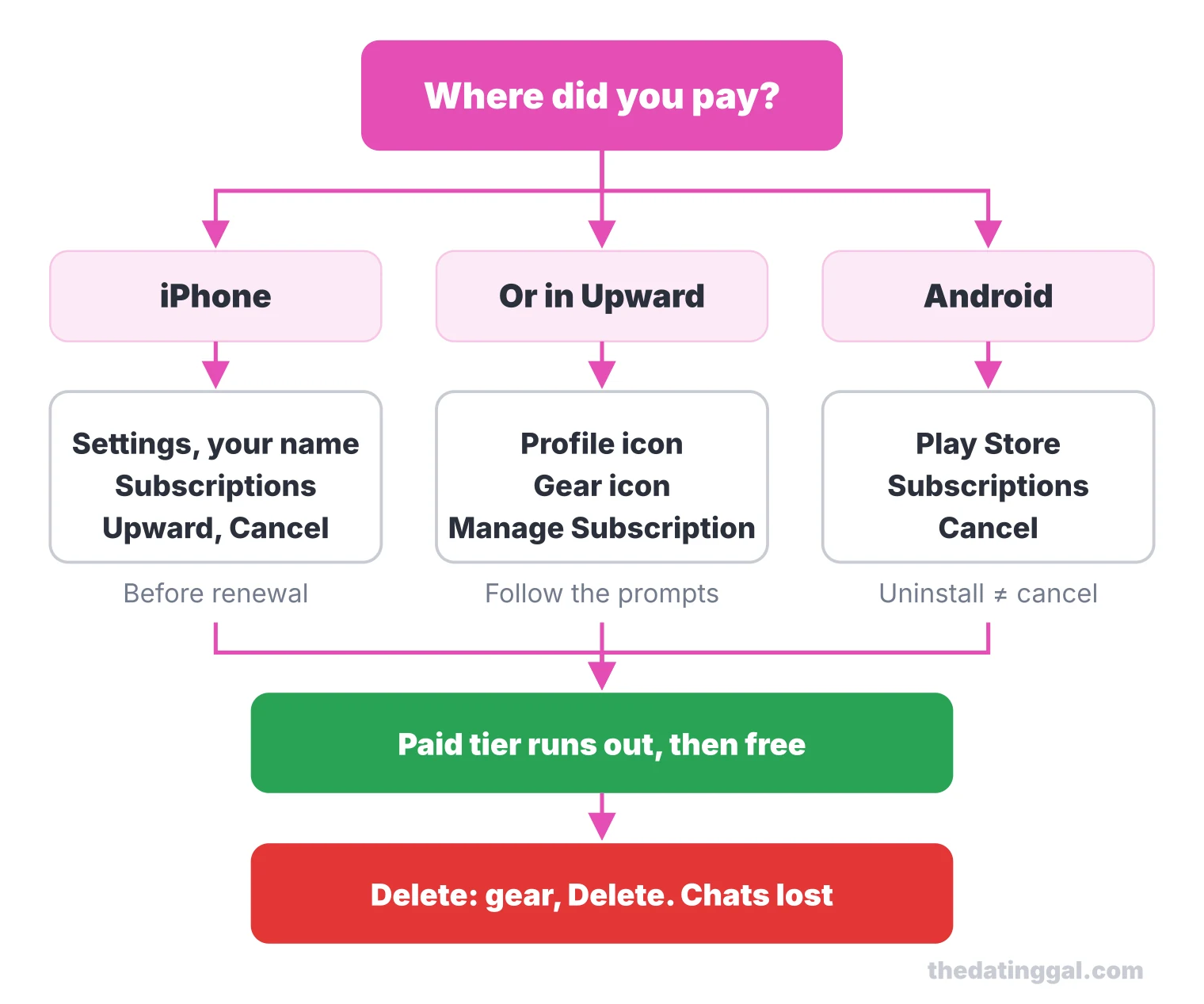
- Cancel the subscription. On iPhone: Settings, your name, Subscriptions, Upward, Cancel. Or in the app: Profile icon, gear icon, Manage Subscription, then follow the prompts (cancellation guide). On Android: Play Store, Payments and subscriptions, Subscriptions, Upward, Cancel. Subscriptions renew automatically, so do it before the renewal date.
- Know the refund rules. The terms say purchases are generally nonrefundable, and unused virtual items are lost when an account closes, including after a ban. If you live in Arizona, California, Colorado, Connecticut, Illinois, Iowa, Minnesota, New York, North Carolina, Ohio, Rhode Island or Wisconsin, you can cancel without penalty until midnight of the third business day after subscribing. If you paid through Apple, Apple handles the refund.
- Delete the account. Profile icon, gear icon, scroll to the bottom and tap delete. Upward’s deletion guide warns this removes all your connections and conversations for good. If you only need a break, toggle off “Show me on Upward” instead to hide your profile.
Upward alternatives
- For a bigger pool with a religion filter: Hinge, with a similar swipe-and-prompt design.
- For long, compatibility-based profiles: eHarmony, better suited to daters over 35.
- For search instead of swiping, and an older crowd: Match.
Christian Mingle is the long-running faith-specific option forum users mention most. For more options, see my picks for serious dating apps or browse all dating site reviews.
How I rate it
I give Upward 3.5 out of 5. That rating is based on public pricing, features, safety tools, app store reputation and value, not on hands-on use. Value for money: 2.5 (matching and chatting are free, but the most wanted feature sits in the second paid tier). Safety and verification: 4 (required Face Check, age checks, message filters and anonymous reports, but no background checks). Evidence of an active user base: 4 (162K App Store ratings, 1M+ Android downloads, updates in September and October 2026). Features for its audience: 3.5 (Core Values, Marriage Timeline and Chivalry Mode fit marriage-minded singles; weak denomination and distance filtering). Transparency: 2.5 (auto-renewal and cancellation are documented, but prices are not published outside the app stores and refunds are rare).
Frequently asked questions
How much does Upward dating cost?
Upward is free to download, match and chat. On the US App Store (October 2026), Elite costs $17.99 to $21.99 for a week, $19.99 or $29.99 for a month, $44.99 for 3 months and $71.99 for 6 months. Google Play says subscriptions start at $9.99, and the exact price shows at checkout in the app.
Can you match with people on Upward without paying?
Yes. Swiping, matching and messaging after a mutual match are free. What you cannot do for free is see who already liked you: that needs the Elite tier, not just Premium.
Why are people so far away on Upward?
You can set a distance range under Profile, gear icon, seeking preferences, but reviewers still report matches hundreds of miles away. The usual causes are a small pool of members near you and a location that follows your phone when you travel. If your stack is mostly distant after a week of free use, paying will not make the local pool bigger.
Is Upward actually worth it?
It is worth trying free if you are a churchgoing single in or near a US metro, since it has 4.3 stars from 162K App Store ratings and required photo verification. Paying is only worth it once you see local profiles you like. Rural users and anyone who needs strict denomination filters may do better elsewhere.
Is Upward owned by Match Group?
Yes. Upward is published by Affinity Apps LLC at Match Group's Dallas address, and Match Group's 2025 annual report lists Upward among its Emerging brands. Your profile can also appear on other Match Group apps unless you turn off Expanded Discovery & Interaction in your privacy settings.
What is the least scammy dating app?
No app is scam-free. Your best protection is an app with required photo or video verification and in-app reporting, plus your own rules: never send money, keep chats in the app, and video call before meeting. Upward requires a Face Check video selfie, but its terms say it does not run background checks.